TCP vs UDP: when to use what, and how TCP relates to HTTP
Imagine the internet as a massive, bustling postal system. Billions of messages fly across the globe every second, but without a set of shared rules, those messages would simply be a chaotic soup of digital noise. To make sense of it all, we use protocols—standardized sets of rules that determine how data moves from point A to point B.
Two of the most important rulesets at the heart of the internet are TCP and UDP. While they both live in the "Transport Layer" of networking, they behave like two very different types of delivery services.
TCP: the reliable courier
TCP (Transmission Control Protocol) is the internet’s gold standard for reliability. Think of it like a high-end courier service that requires a signature for every package.
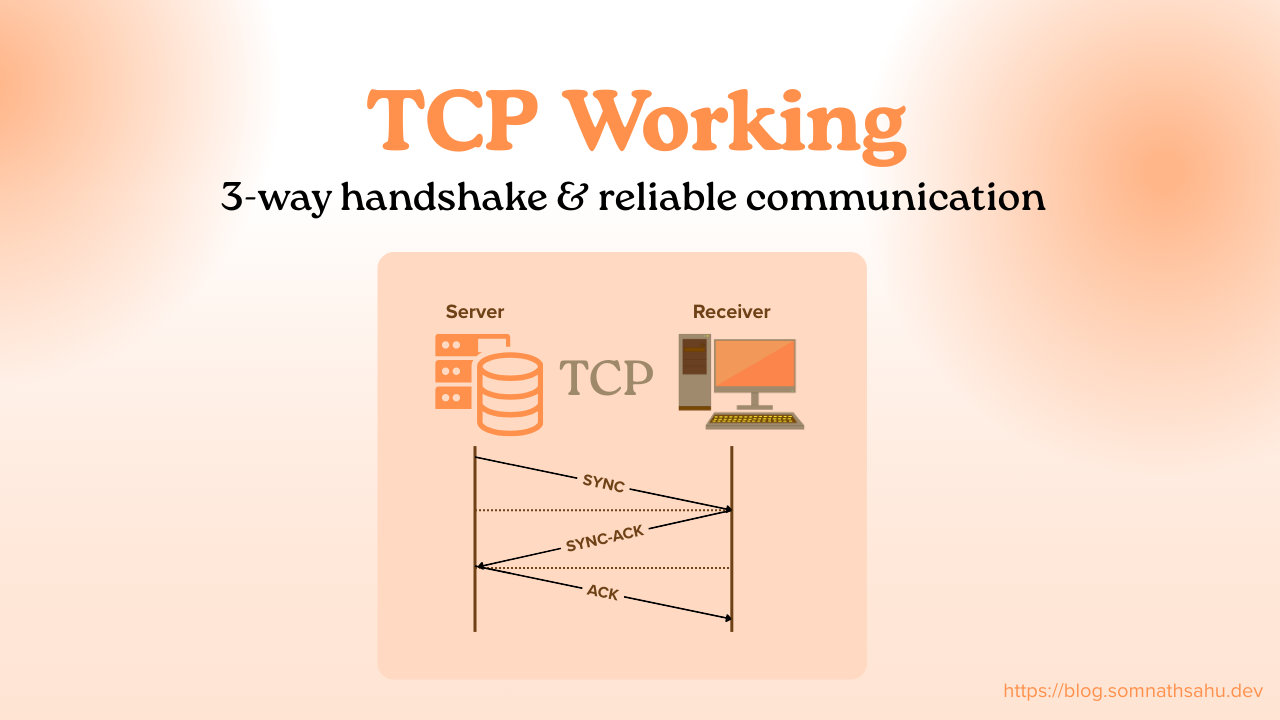
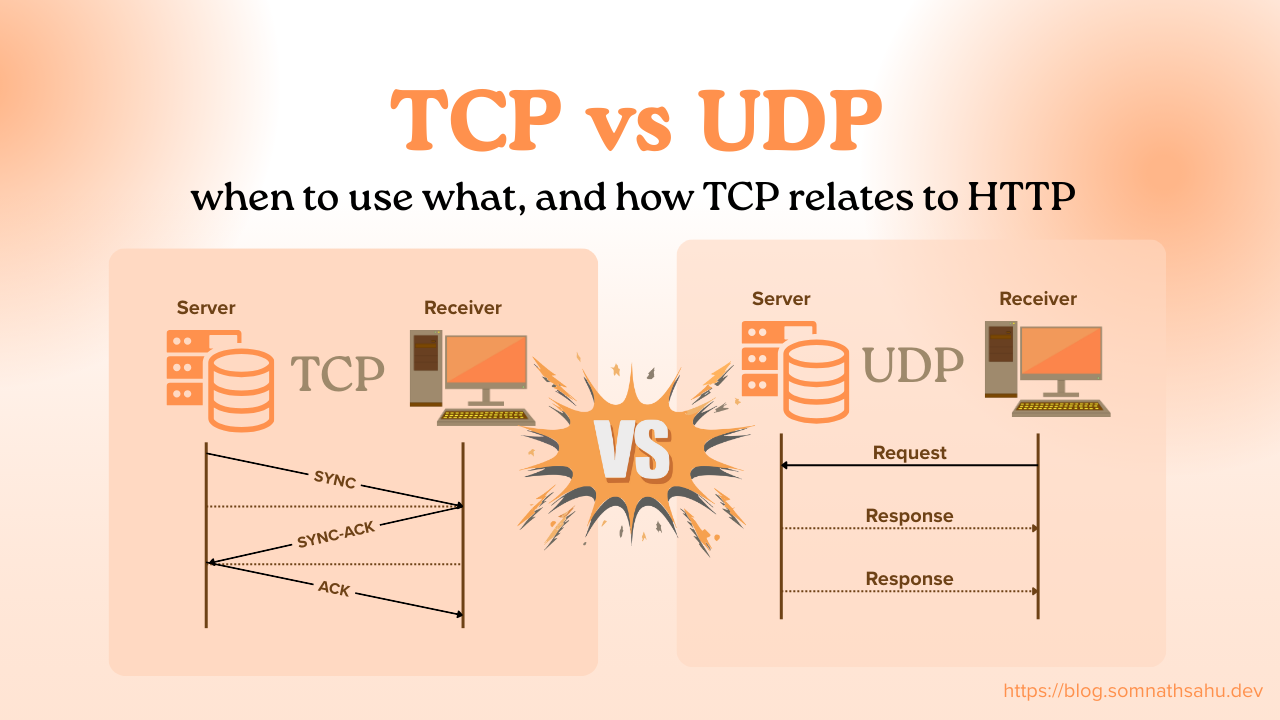
When you use TCP, the sender and receiver perform a "three-way handshake" to establish a connection before any data even moves. Once the data starts flowing, TCP tracks every single packet. If a piece of data goes missing or arrives out of order, TCP stops everything and asks for it to be resent. It ensures that what you send is exactly what the other person receives—no exceptions.
It works via sync → sync ack → ack segment

UDP: the live broadcaster
UDP (User Datagram Protocol), on the other hand, is built for speed. If TCP is a formal courier, UDP is like a live megaphone announcement. It doesn’t care if you missed the first three words of the sentence; it’s going to keep talking anyway.
UDP is "connectionless." It just starts throwing data at the destination without checking if the receiver is ready or if the data actually arrived. There is no error correction and no re-sending. It’s fast, lightweight, and efficient, but it’s "risky" because data can easily be lost in transit.

Key Differences at a Glance
| Feature | TCP | UDP |
| Reliability | Guaranteed delivery | No guarantee (Best effort) |
| Speed | Slower (due to overhead) | Faster (no handshakes) |
| Order | Data arrives in sequence | Data can arrive out of order |
| Method | Connection-oriented | Connectionless |
When to Use What?
Choose TCP when accuracy is non-negotiable
If losing a single "packet" of data would break the entire result, you need TCP.
Web Browsing: You wouldn't want a website to load with missing text or broken code.
Email: An email missing the middle paragraph is useless.
File Downloads: A corrupted .zip file won't open.
Choose UDP when speed is the priority
In "real-time" scenarios, a slight delay (latency) is much worse than a tiny bit of missing data.
Online Gaming: If you’re playing a fast-paced shooter, you need the most current data now. If a packet is lost, the game just moves on to the next one rather than pausing to find the old one.
Video Streaming/VoIP: During a Zoom call, if the connection glitters for a millisecond, you might see a few stray pixels, but the video keeps playing. If Zoom used TCP, the video would freeze constantly to "catch up" on lost frames.
Where Does HTTP Fit In?
A common point of confusion for beginners is how HTTP (Hypertext Transfer Protocol) relates to these two. You might wonder: "If I'm using HTTP to browse the web, am I still using TCP?"
The answer is yes.
To understand this, we use the OSI Model, which layers protocols on top of each other.
TCP is a Transport Layer protocol. It handles the "how" of moving data (the pipes).
HTTP is an Application Layer protocol. It handles the "what" of the data (the actual website content).
The Relationship: HTTP Runs on TCP
Think of it this way: TCP is the train tracks, and HTTP is the train. The tracks provide the path and the safety mechanisms to ensure the train doesn't derail. The train carries the actual passengers (the HTML, images, and data of a website).
Because websites need to be 100% accurate to function, HTTP almost always uses TCP. When you type a URL into your browser, your computer first opens a TCP connection to the server. Once that "pipe" is secure and open, the HTTP requests and responses travel through it.
Why HTTP Doesn't Replace TCP
HTTP cannot replace TCP because they do completely different jobs. HTTP doesn't know how to "resend a lost packet" or "reorder data"—it relies on TCP to handle those messy networking details.
In recent years, a new version called HTTP/3 has actually started using a protocol called QUIC, which is built on top of UDP. However, QUIC adds its own reliability features to UDP to make it act more like TCP but faster. Even then, the concept remains: the application (HTTP) needs a transport layer (TCP/UDP) to move its data across the web.
Summary
The internet is a balance between reliability and velocity. TCP provides the sturdy foundation for our files, emails, and web pages, while UDP provides the raw speed needed for our calls and games. HTTP sits gracefully on top, focusing on delivering the content we love while trusting the layers below to handle the heavy lifting.