Inside git: how it works and the role of the .git folder
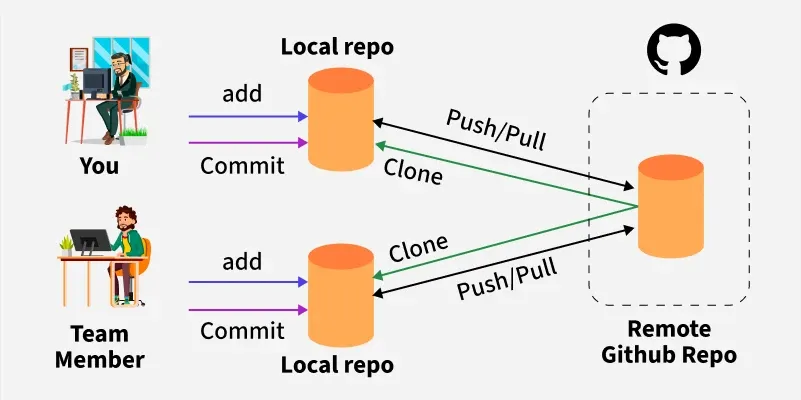
Git is a distributed version control system which helps a developer to track and manages personal or collaborative code files over the time. GIT is an open-source system created by Linus Torvalds in 2005.
To start working on git, you need to install and configure the git in your local system. To understand the git as how it works and the role of this .git folder. Let’s dive into this.
What is .git folder:
.git folder is automatically created during your first initializing the project or folder by running git init command in your terminal. Git stores everything including files, directories, and history. It stores as immutable objects identified by a 40-character SHA-1 hash. These are stored in .git/objects.
Key components of .git folder
The contents of the .git folder might seem confusing at first, but every file and subdirectory has a specific purpose.
1. HEAD
The
HEADfile points to the current branch reference.For example:
ref: refs/heads/mainIt tracks which branch you're currently on.
2. config
This config contains repository-specific configuration settings (like remotes, user info, aliases), separate from global git config.
Example:
  [core]
      repositoryformatversion = 0
      filemode = false
      bare = false
      logallrefupdates = true
      symlinks = false
      ignorecase = true
  [remote "origin"]
          url = git@github.com:user/repo.git
          fetch = +refs/heads/*:refs/remotes/origin/*
3. description
This description is text file which used mostly by graphical interfaces or Github desktop or git lenses to describe the repository. Usually ignored in bare repositories.
4. hooks/
This hooks folder Contains scripts that git can trigger at key events, such as before a commit (pre-commit) or after a push (post-receive). It has stored custom logic for code quality checks, CI/CD, etc., can be executed here.
5. info/
Inside this info/ folder consists of the exclude file, which can be used to ignore files locally, supplementing .gitignore. It helps prevent pushing any confidential or unnecessary files.
6. objects/
This objects/ folder is known for the heart of Git’s content storage. Here git stores everything—files, directories, commits—as objects using the content-addressed storage model. Here the objects are named based on the SHA-1 (or SHA-256) hash of their content. In this folder every objects have a unique address.
blobs: store file contents
* trees: represent directory structures
* commits: record changes and metadata
* tags: point to specific objects
Structure example:
objects/bg/3cg3434567r34...
7. refs/
This refs/ folder contains references, or pointers to commits.
refs/heads/: Referred local branchesrefs/tags/: Referred for Tagsrefs/remotes/: Referred for Remote branches
8. logs/
Logs folder stores recent updates to references which helps recover the lost commits or even you can see previous HEAD position. The command is used to check the recent updates : git reflog
9. index
index is a binary file which keeps track of changes staged for the next commit. In this file every content has been tracked.
10. Packed files
Git may also optimize storage using packfiles (visible as pack subfolder within objects/). It combines many objects into compressed files to save space and improve performance.
Final words
The .git folder is much more than a hidden subdirectory—it’s a central nervous system of your project repository. By understanding what’s inside and how Git builds its history through objects, trees, commits, and references.
Disclaimer: image sourced from https://www.geeksforgeeks.org/